WooCommerce Wholesale Lead Capture
Active attacks are exploiting an unauthenticated file upload flaw in WooCommerce Wholesale Lead Capture 2.0.3.1 and earlier. Update to 2.0.3.2 and investigate for PHP webshells.

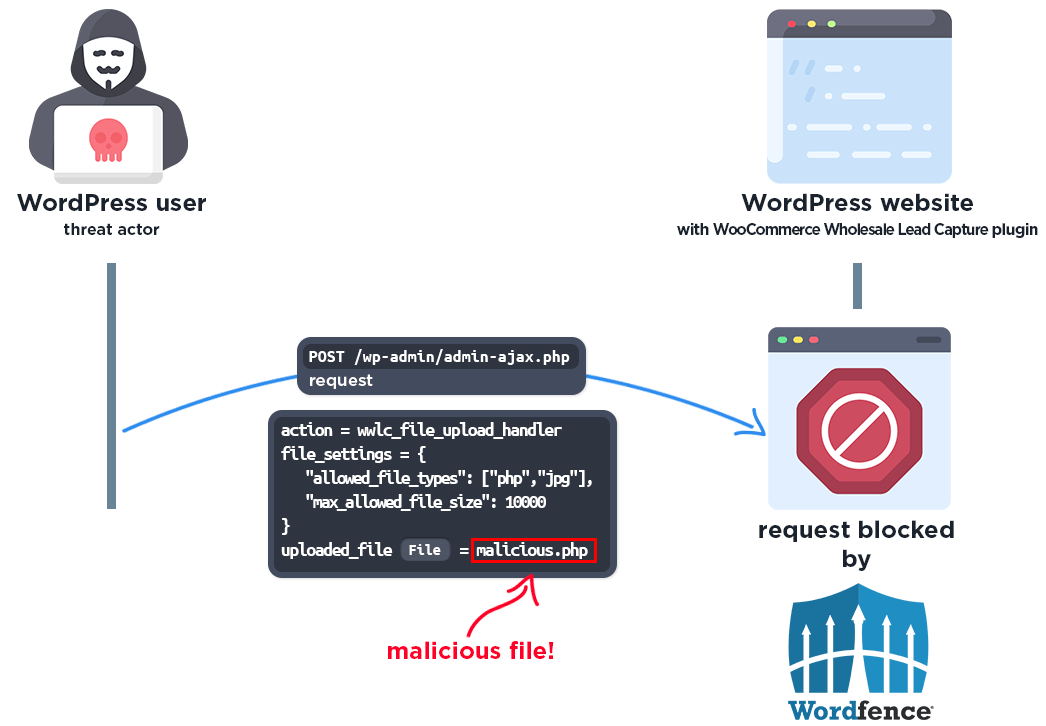
Wordfence is tracking active exploitation of an unauthenticated arbitrary file upload vulnerability in the Wholesale Lead Capture Plugin for WooCommerce. The vulnerable upload handler can be abused to place executable PHP files on a WordPress server, giving an attacker a path to remote code execution and complete site compromise.
Wordfence reported more than 100,000 blocked exploit attempts and estimates that the premium plugin is installed on roughly 6,000 sites. Administrators running version 2.0.3.1 or earlier should treat this as an incident-response priority, not a routine update.
Vulnerability summary
| Plugin | Wholesale Lead Capture Plugin for WooCommerce |
|---|---|
| Plugin slug | woocommerce-wholesale-lead-capture |
| Affected versions | 2.0.3.1 and earlier |
| Fixed version | 2.0.3.2 or later |
| Primary vulnerability | CVE-2026-27540, unauthenticated arbitrary file upload |
| Severity | Critical, CVSS 9.8 |
| Companion vulnerability | CVE-2026-27542, unauthenticated privilege escalation to administrator, CVSS 9.8 |
| Authentication required | None |
| Active exploitation | Confirmed by Wordfence |
How the file upload flaw works
The plugin registers the unauthenticated AJAX action wwlc_file_upload_handler for wholesale registration file uploads. In affected versions, the handler reads a file_settings value supplied by the request and trusts its allowed_file_types list. An attacker can therefore claim that PHP is an allowed extension.
The vulnerable path also calls WordPress’s upload function with MIME-type testing disabled. That combination allows an unauthenticated request to pass the plugin’s extension check and write an executable PHP file into the site’s upload area. If the web server executes PHP in that directory, the uploaded file can become a webshell.
No WordPress account or user interaction is required. A successful attacker can create administrator accounts, plant persistent backdoors, modify site content, steal database credentials, or pivot into other sites hosted under the same account.
Indicators of compromise
Review access logs for POST requests to /wp-admin/admin-ajax.php where the request body contains action=wwlc_file_upload_handler. Also inspect the uploads tree for recently created PHP-family files. Wordfence observed filenames such as shell.php, but the filename is attacker-controlled and may differ.
Wordfence identified the following addresses among the most active sources. Treat them as investigation pivots rather than a complete blocklist:
92.241.13.21331.59.129.1502a0f:85c1:840:5389::192.241.13.14023.137.105.21423.180.120.140104.194.9.138187.75.114.36114.10.43.20337.114.144.209
Immediate remediation
- Update to version 2.0.3.2 or later immediately. Confirm the installed version after the update.
- If an immediate update is impossible, deactivate and remove the plugin until it can be replaced with a patched build. A WAF rule is only a temporary control.
- Search the upload directory for executable files and inspect every unexpected result.
- Review administrator accounts created or modified since the earliest suspicious request.
- Check access logs for the vulnerable AJAX action and requests to newly created PHP files.
- If compromise is found, take the site out of service, preserve logs, remove backdoors, rotate WordPress salts and credentials, rotate hosting/database/SFTP credentials, and restore from a known-clean backup where appropriate.
Verification commands
Check the installed plugin version and apply the vendor update:
wp plugin get woocommerce-wholesale-lead-capture --fields=name,status,version --format=table
wp plugin update woocommerce-wholesale-lead-capture
wp plugin get woocommerce-wholesale-lead-capture --field=version
List recently registered administrator accounts:
wp user list --role=administrator --fields=ID,user_login,user_email,user_registered --format=tableSearch the uploads directory for PHP-family files created or changed during the last 30 days:
find wp-content/uploads -type f \( -iname '*.php' -o -iname '*.phtml' -o -iname '*.phar' \) -mtime -30 -printA clean result from these checks does not prove the site was never compromised. Attackers can rename files, alter timestamps, create scheduled tasks, or place persistence outside the uploads directory.
Temporary defense in depth
Where Apache honors per-directory configuration, the following rule can prevent direct execution of PHP-family files inside wp-content/uploads. Test it on staging first because hosting configurations differ. This does not replace updating the plugin.
<FilesMatch "\.(php|phtml|phar)$">
    Require all denied
</FilesMatch>
At the WAF or reverse proxy, temporarily block unauthenticated requests that combine /wp-admin/admin-ajax.php with the action wwlc_file_upload_handler. Avoid blocking all admin-ajax.php traffic because many legitimate WordPress features depend on it.
Companion administrator privilege escalation
The same affected release line also contains CVE-2026-27542, an unauthenticated privilege-escalation issue that can allow an attacker to become an administrator. Wordfence and WPScan list version 2.0.3.2 as the patched release for both vulnerabilities. Sites running an affected version should therefore review administrator accounts even if no suspicious upload is immediately visible.
Sources
- Wordfence active-exploitation advisory
- Wordfence Intelligence: CVE-2026-27540
- Wordfence Intelligence: CVE-2026-27542
- WPScan: unauthenticated privilege escalation
Disclosure and attack telemetry are attributed to Wordfence. WPDeeply did not discover these vulnerabilities.
